optionally
Supercharged typed optionals interface support for Arturo Programming Language

~ CODE IS ART ~


At a Glance
Installation
arturo -p install optionally
or
import {optionally}!
Documentation
Overview
optionally is a DSL library that supercharges the support for optional parameters in Arturo.
Under the hood this generates boilerplate to handle many common patterns we had to do manually every single time we wanted to have a robust and flexible API with optionals.
optionally injects variables to your scope, generate predicates, do type checking at runtime and adds sensible defaults (null for typed optionals, false for predicates).
Signature
optionally [params :block body :block] => :block
| Parameter | Type | Description |
|---|---|---|
params | :block | A declaration block of optional parameter names and their types |
body | :block | The function body that will be executed after optionals are resolved |
Returns: a new :block that, when used as a function body, injects attribute handling code before body.
Usage
optionally is designed to be used inline as the body of a function definition ($[...]). It replaces the body block:
myFunc: $[<required params>] optionally [<optional params>] [<body>]
Parameter Kinds
Typed Optionals
Declare a name followed by its type. The parameter defaults to null if not provided, and is type-checked at runtime (must be the declared type or null).
greet: $[name :string] optionally [greeting :string][
    print (greeting ?? "Hello") ++ ", " ++ name
]

greet "World"                   ; Hello, World
greet.greeting: "Hi" "World"    ; Hi, World
Predicate Optionals (:logical)
Parameters suffixed with ? are treated as predicates — boolean flags that default to false. optionally automatically generates an affirmation shorthand (the name without ?) so users can pass the flag without a value.
fetch: $[url :string] optionally [verbose? :logical][
    if verbose? -> print ~"Fetching |url|..."
    ; ...
]

fetch "https://example.com"                ; verbose? = false
fetch.verbose "https://example.com"        ; verbose? = true
fetch.verbose? "https://example.com"       ; verbose? = true
fetch.verbose?: true "https://example.com" ; verbose? = true
fetch.verbose: true "https://example.com"  ; verbose? = true
Note: The affirmation shorthand (
.verbose) is only generated when the parameter name ends with?. A parameter namedadmin(without?) will not generateadmin?.
Calling Conventions
All optionals are passed as Arturo attributes (.name: value or .name for flags):
| Syntax | Meaning |
|---|---|
.flag | Sets a predicate to true (affirmation shorthand) |
.flag? | Sets a predicate to true |
.flag?: true | Sets a predicate to true |
.flag?: false | Sets a predicate to false |
.flag: true | Sets a predicate to true |
.flag: false | Sets a predicate to false |
.param: value | Sets a typed optional to value |
| (omitted) | Typed optionals default to null, predicates to false |
Multiple optionals can be chained:
clone.jobs: 4 .origin: "upstream" "https://github.com/RickBarretto/optionally.art"
Defaults
| Kind | Default when omitted |
|---|---|
Predicate (:logical with ? suffix) | false |
| Typed optional | null |
Use the ?? operator in your body to substitute custom defaults:
person: $[name :string] optionally [age :integer][
    #[
        name: name
        age: age ?? "Not provided"
    ]
]

person "Rick"           ; age => "Not provided"
person.age: 30 "Rick"   ; age => 30
Type Safety
Typed optionals are validated at runtime. If a caller passes a value of the wrong type, optionally raises an assertion error. The value must either match the declared type or be null.
clone: $[remote :string] optionally [jobs :integer][...]

clone.jobs: 4 "repo"    ; OK — :integer
clone.jobs: "x" "repo"  ; ERROR — expected :integer or :null
Full Examples
HTML Tag Builder
A function that renders an HTML tag, optionally self-closing:
import {optionally}!

tag: $[name :string content :any] optionally [closed? :logical][
    join @[
        ~"<|name|/>"
        content
        if closed? -> ~"</|name|>"
    ]
]

tag "input" ""
; => <input/>

tag.closed "article" "Lorem Ipsum..."
; => <article/>Lorem Ipsum...</article>
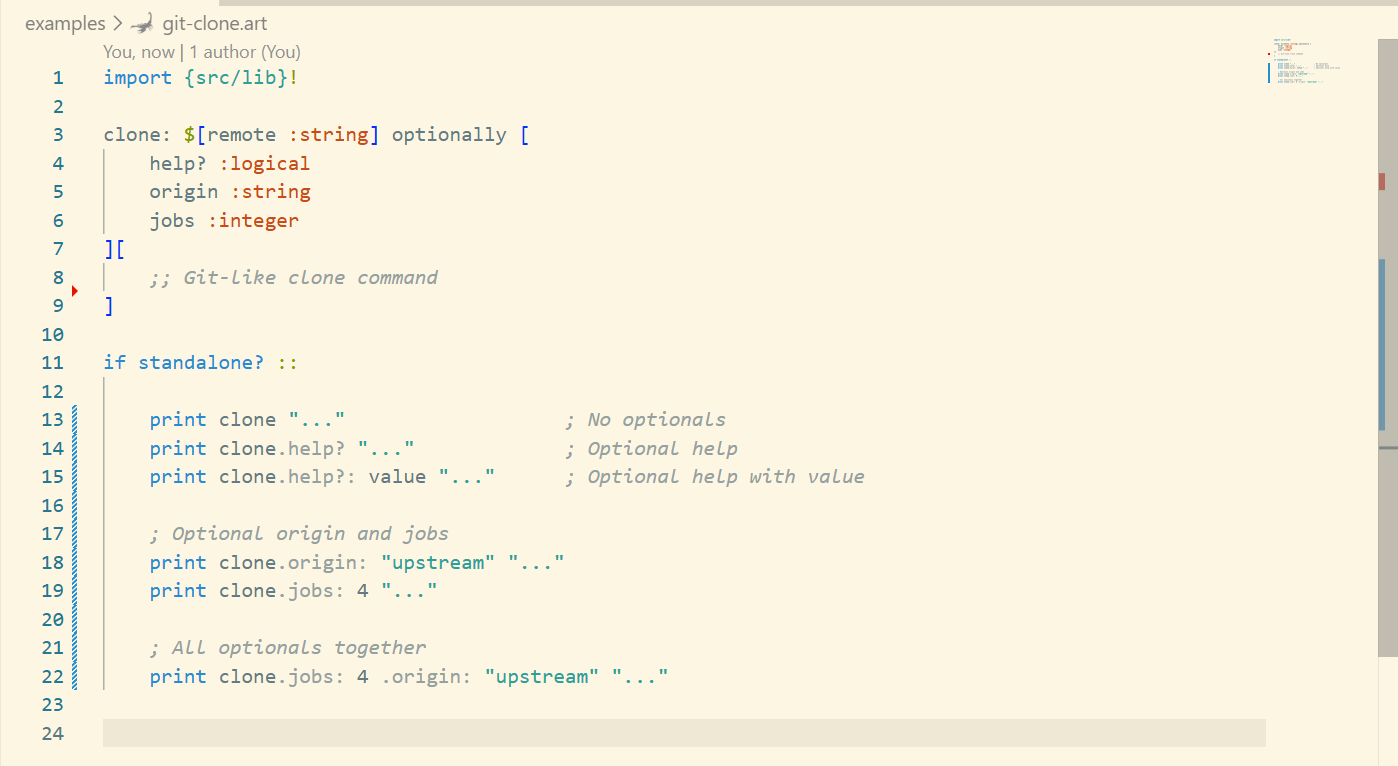
Git Clone Command
A function with multiple optional parameters of different types:
import {optionally}!

clone: $[remote :string] optionally [
    help? :logical
    origin :string
    jobs :integer
][
    #[
        remote: remote
        help?: help?
        origin: origin
        jobs: jobs
    ]
]

clone "https://github.com/RickBarretto/optionally.art"
; [remote:https://github.com/RickBarretto/optionally.art help?:false origin:null jobs:null]

clone.help "https://github.com/RickBarretto/optionally.art"
; [remote:https://github.com/RickBarretto/optionally.art help?:true origin:null jobs:null]

clone.origin: "upstream" "https://github.com/RickBarretto/optionally.art"
; [remote:https://github.com/RickBarretto/optionally.art help?:false origin:upstream jobs:null]

clone.jobs: 4 .origin: "upstream" "https://github.com/RickBarretto/optionally.art"
; [remote:https://github.com/RickBarretto/optionally.art help?:false origin:upstream jobs:4]
How It Works
optionally is a runtime-time metaprogramming function. It attaches to your actual function body by prepending its generated boilerplate to it.
For each declared optional:
- Attribute injection — emits
let <name> attr <name>to read the attribute value into a local variable. - Predicate expansion — for parameters ending in
?, also generates the affirmation form (without?) and combines them withany?so either spelling activates the flag. - Type checking — emits
ensure -> or? is? <type> <name> null? <name>to validate the value at runtime.
The result is a flat block (preBody ++ body) that Arturo executes as a normal function body — no closures, no overhead.
Requirements
- Arturo
>= 0.10.0
| 1.0.0 | 19 February 2026 | 356780 / 17 files |
| unitt | 3.1.1 |